How to Use Online Calculators: A Complete Step-by-Step Guide
Online calculators are designed to make calculations fast, accurate, and convenient — but only if you know how to feed them the right information. This guide walks through picking the right tool, entering data so it's actually interpreted correctly, reading advanced functions, checking your results, and the mistakes that most often throw off an otherwise "correct" calculation.
1. Choose the Right Calculator for the Job
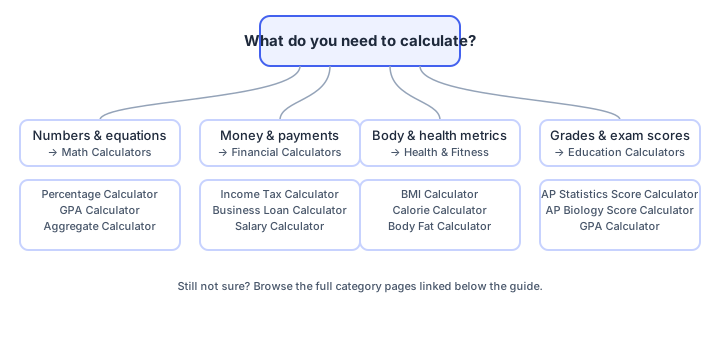
The biggest source of wrong answers isn't bad math — it's using the wrong calculator for the question you're actually asking. Start by matching your task to a category:
- Math Calculators: percentages, GPA, aggregates, and other pure-number problems. Try the Percentage Calculator or Aggregate Calculator.
- Financial Calculators: loans, salary, and tax questions. See the Salary Calculator, Income Tax Calculator, or Business Loan Calculator.
- Health & Fitness Calculators: body metrics like the BMI Calculator or Calorie Calculator.
- Education Calculators: exam and grade estimates such as the AP Statistics Score Calculator.
If you're not sure which category fits, the decision guide below maps common questions to the right tool:
2. Enter Your Data in the Right Format
Most "wrong" results are actually input errors, not calculator bugs. Before you click calculate, check three things:
- Units match the field label. A BMI calculator asking for height in centimeters will give a nonsense result if you type inches. If a calculator offers both metric and imperial modes, confirm which one is selected before entering numbers.
- Percentages vs. decimals. Some fields expect "15" to mean 15%, others expect "0.15." Read the field's placeholder text or helper label to see which one it wants.
- No stray characters. Extra spaces, currency symbols ($, %) typed into a plain number field, or commas in large numbers (1,000 vs 1000) can cause a field to reject your input or silently misread it.
3. Understand Special Functions
Some calculators expose functions beyond basic arithmetic. Knowing what these mean before you rely on the output helps you catch a mistyped input:
- Trigonometric functions like sin(), cos(), and tan() — used in scientific and engineering calculators, typically expecting degrees or radians (check which mode is active).
- Percentage operations for discounts, markups, or profit/loss margins.
- Exponents and roots (x², √x) for scientific calculations and statistics.
4. How Online Calculators Work Behind the Scenes
An online calculator is just a formula wrapped in a form. When you click "Calculate," JavaScript running in your browser reads the values you entered, plugs them into a fixed formula, and displays the output — no data is sent to a server for most simple calculators. That matters for two practical reasons:
- Rounding is a design choice, not an error. A calculator might round to 2 decimal places for currency or 1 decimal place for percentages. If your manual math gives a slightly different figure, check how many decimal places the tool displays before assuming something is wrong.
- The formula is only as good as its assumptions. A loan calculator that assumes monthly compounding will give a different answer than one assuming daily compounding, even with identical inputs. Good calculators state their assumptions near the result or in the page content — look for that before comparing two tools' answers.
5. Click Calculate and Read the Output
After entering your data, press "Calculate" (or "="). Most calculators return results instantly, and many show a breakdown rather than a single number — for example, a loan calculator might show the monthly payment, total interest, and total repaid separately. Read the full breakdown, not just the headline number, especially for financial tools.
6. Verify the Result Before You Rely On It
For anything that matters — taxes, loan decisions, academic scores — spend thirty seconds sanity-checking the output:
- Try one simple, round-number input you can check in your head (e.g., 10% of 100 should be 10) to confirm the calculator is behaving as expected.
- Compare against a second source if the decision is high-stakes, such as a bank's own loan estimate or your school's official grading scale.
- Check that the units in the result match what you expected (percentage vs. raw number, monthly vs. annual, and so on).
7. Common Mistakes That Lead to Wrong Results
- Typing weight in pounds into a field labeled kilograms, or vice versa.
- Leaving a field on its default value because it was overlooked, rather than actually entering your own number.
- Confusing annual and monthly figures in loan, salary, or interest calculators.
- Assuming a single-decimal result is "wrong" when it's simply been rounded for display.
- Using a calculator built for a different region's tax brackets, currency, or academic scale.
8. Accessibility and Device Tips
Well-built calculators work the same way whether you're on a phone or a laptop:
- Number fields should bring up a numeric keyboard automatically on mobile — if you're seeing a full alphabet keyboard for a number field, double-check you tapped the right input.
- Zooming in (pinch-to-zoom or browser text size) shouldn't break the layout on a well-built calculator page.
- If you use a screen reader, look for calculators that label each input clearly (e.g., "Weight in kilograms") rather than relying on placeholder text alone, since placeholders can disappear once you start typing.
Frequently Asked Questions
How do I use an online calculator?
To use an online calculator, open the calculator on the website, enter your numbers or data, select any necessary options, click calculate, and review the results.
Do I need to download an online calculator?
No, online calculators can be used directly in your web browser without any downloads or installation.
Can I use online calculators on my phone or tablet?
Yes, online calculators are mobile-friendly and work on any device including phones, tablets, and desktop computers.
Are online calculator results accurate?
Yes, calculators on trusted websites are built using verified formulas and tested for accuracy, though it's still good practice to spot-check important results.
Can I modify inputs and recalculate?
Yes, you can change your input values and click the calculate button again to get new results instantly.
Do online calculators provide explanations or additional info?
Many online calculators provide explanations, graphs, tables, or suggestions to help users understand the results.
Related Calculators
Explore the full library at Small Calculator Hub.