Online Aggregate Calculator
Aggregate Calculator
Aggregate Calculator – Calculate Total Marks, Average, and Percentage Easily
When exam season ends and result cards arrive, the first thing every student wants to know is their overall standing. Whether you are applying for college admissions, tracking your semester progress, or simply comparing results with friends, calculating your "aggregate" is essential.
However, manually adding up scores for five, seven, or ten subjects can be tedious. One small mistake in addition or division can lead to the wrong result. That is where our Aggregate Calculator comes in. This tool is designed to help students, parents, and teachers find total marks, averages, and percentages in just a few clicks.
What Is an Aggregate Calculator?
An Aggregate Calculator is a specialized digital tool used to combine individual subject scores into a single, comprehensive value. In academic terms, "aggregate" refers to the sum total of marks obtained across various subjects or exams.
Instead of looking at how you performed in just Math or English, the aggregate gives you the "big picture" of your academic performance. Our marks aggregate calculator takes the raw data from your mark sheet and processes it to provide three key metrics:
- Total Marks Obtained
- Average Marks per Subject
- Overall Percentage
What are Aggregate Marks?
In the world of education, aggregate marks represent the collective score of a student. For example, if you sit for five exams, your aggregate is the sum of the marks earned in all five.
Calculating the aggregate is the standard way for universities and boards to rank students. Most competitive admission processes don't just look at one subject; they look at your aggregate percentage to determine if you meet their eligibility criteria.
How to Calculate Aggregate Marks
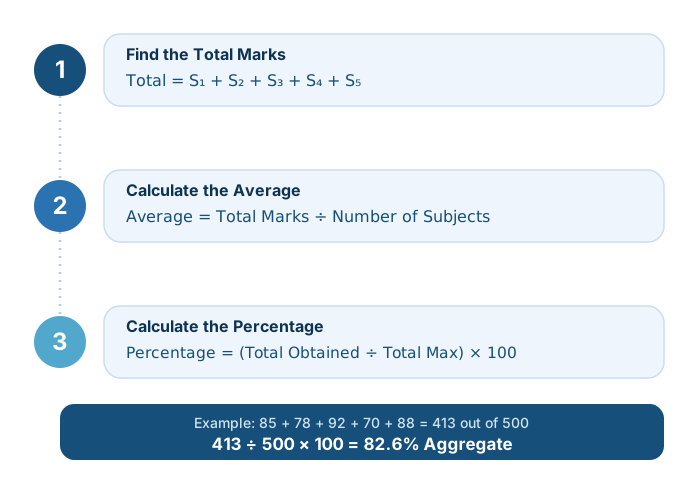
If you want to understand the math behind the tool, it's quite simple. To calculate aggregate marks manually, you need to follow a three-step mathematical process.
1. Find the Total Marks
First, add the marks of all your subjects together.
Formula:
2. Calculate the Average
The average tells you what your typical score is across all subjects. To find this, divide your total marks by the number of subjects you have.
Formula:
3. Calculate the Percentage
The percentage calculator for subjects uses the ratio of your obtained marks to the maximum possible marks, multiplied by 100.
Formula:
How to Use the Aggregate Calculator
Using our online tool is much faster than using a handheld calculator or a pen and paper. Follow these simple steps to get your results instantly:
- Enter Marks Obtained: Input the marks you scored in each of the five subject fields.
- Enter Maximum Marks: Next to each subject, enter the total possible marks for that subject (e.g., 100 for Theory or 50 for Practical) — this lets the calculator handle subjects with different maximums correctly.
- Click Calculate: Hit the "Calculate Aggregate" button.
- View Results: The Aggregate Calculator will instantly display your total marks obtained out of your total maximum marks, your aggregate percentage, and an estimated grade.
Benefits of Using an Online Aggregate Calculator
Why should you use an online tool instead of doing it yourself? Here are a few reasons:
Example Calculation
Let's look at a practical example to see how the aggregate percentage calculator works in a real-life scenario.
Imagine a student, Sarah, who has the following scores for her semester:
| Subject | Marks Obtained | Maximum Marks |
|---|---|---|
| Mathematics | 85 | 100 |
| English | 78 | 100 |
| Science | 92 | 100 |
| History | 70 | 100 |
| Geography | 88 | 100 |
Manual Calculation:
- Total Marks: 85 + 78 + 92 + 70 + 88 = 413
- Average: 413 ÷ 5 = 82.6
- Percentage: (413 ÷ 500) × 100 = 82.6%
✅ With our Aggregate Calculator, Sarah simply enters those five obtained/maximum pairs and gets the same accurate result without needing to do the addition herself!
Who Can Use This Calculator?
This tool is versatile and serves various groups within the academic community:
- Students: High school and university students can use it to track their GPA or prepare for college applications.
- Teachers: Teachers can use it to quickly calculate the final grades of an entire class, saving hours of manual labor.
- Parents: Parents can keep track of their children's academic progress throughout the year.
- Academic Institutions: Schools can use these tools during the admission process to verify if applicants meet the required aggregate threshold.
Tips for Improving Your Academic Aggregate
Knowing your aggregate is the first step. If you want to see that number climb higher in the next semester, consider these tips:
- Study Planning: Don't just focus on your favorite subjects. To have a high aggregate, you need a balanced score across all subjects.
- Time Management: Use a study timetable to ensure that "weaker" subjects get more of your attention.
- Practice Tests: Frequently taking mock exams helps you understand the marking scheme, which can boost your total marks.
- Focus on High-Weightage Subjects: If some subjects carry more credits or marks, prioritize them to move your aggregate percentage up significantly.