What Is a Grade Calculator?
A Grade Calculator is an online academic tool that helps students quickly work out their overall grade in a course. Real courses almost never weigh every assignment equally — homework might count for 20% of your grade, quizzes 15%, a midterm 25%, and the final exam the remaining 40%. This page has two tools built around that reality: a weighted grade calculator for any number of custom categories, and a final exam calculator that tells you exactly what score you need to hit a target grade.
How Weighted Grades Are Calculated
Unlike a simple average, a weighted grade multiplies each category's score by its weight before adding everything together. The formula is:
Overall Grade = Σ (Category Score × Category Weight) ÷ Σ (Category Weights)
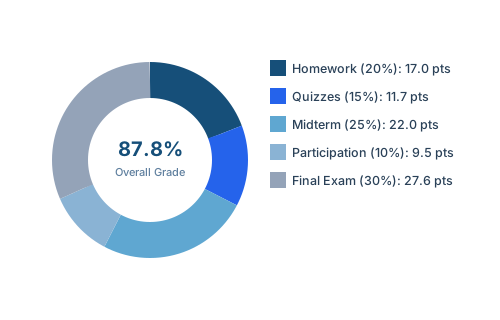
For example, with Homework 85% (weight 20), Quizzes 78% (weight 15), Midterm 88% (weight 25), and Participation 95% (weight 10) — all completed categories — the weighted average so far is 86.0% over 70% of the total grade. If the Final Exam (worth the remaining 30%) comes in at 92%, the overall grade becomes 87.8%, a B+ on the standard scale.
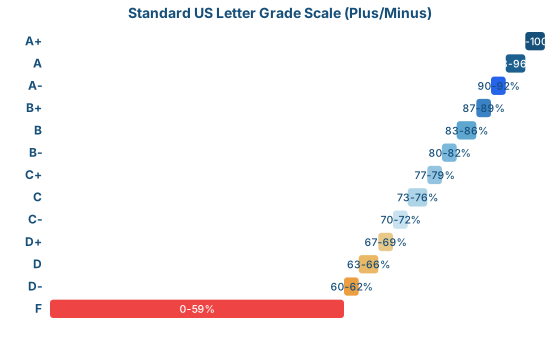
Standard US Letter Grade Scale
This calculator defaults to the most widely used US plus/minus scale. Exact cutoffs vary by school and instructor, so always check your syllabus — but this reference covers the large majority of US high schools and colleges:
What Score Do You Need on Your Final Exam?
This is the single most common question students search for during finals week — and it has an exact answer. Given your current grade, your final exam's weight, and your target overall grade, the required score is:
Required Final Score = (Target Grade − Current Grade × (1 − Final Weight)) ÷ Final Weight
Using the example above — an 86% current average with the final worth 30% of the grade — here's what different target grades actually require:
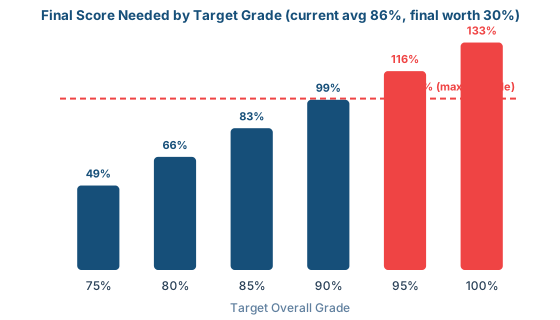
That last point matters: if the calculator tells you the required score is over 100%, your target isn't reachable through the final exam alone — you'd need extra credit, or a more realistic target.
Why the Final Exam's Weight Matters So Much
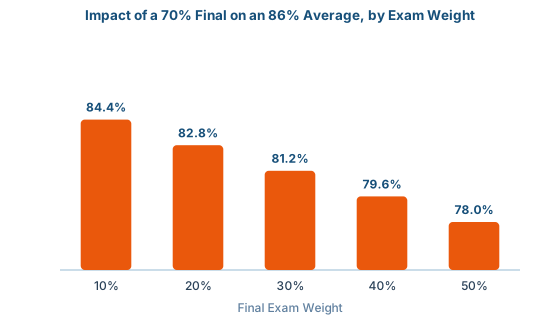
A heavier final exam doesn't just count for more — it also means a bad day hurts more and a great day helps more. Holding your 86% average and a hypothetical 70% final score constant, here's how much the final's weight alone changes your outcome:
Why Use a Grade Calculator?
- Track Academic Progress – see exactly how you're performing throughout the semester, not just a rough guess.
- Set Realistic Goals – find out precisely what you need on upcoming exams to reach your target.
- Reduce Finals-Week Stress – know your actual number instead of guessing.
- Run "What-If" Scenarios – test different exam or category scores before they happen.
Tips for Accurate Grade Calculations
- Enter the correct weights – make sure percentages match your syllabus exactly; they should add up to 100% across all categories including the final.
- Include every category – don't forget smaller quizzes, participation, or projects that still count toward the total.
- Use realistic estimates for "what-if" scores – base projected scores on your actual performance trend, not wishful thinking.
- Verify with official records – always cross-check against your institution's official gradebook and grading policy, since some schools round differently or drop lowest scores.
Frequently Asked Questions (FAQs)
What is a Grade Calculator?
A Grade Calculator is an online tool that helps students calculate their overall grade by entering scores from assignments, quizzes, exams, and other coursework, weighted according to how much each category counts toward the final grade.
How do I use the weighted Grade Calculator?
Add a row for each grading category in your course (like Homework, Quizzes, or Midterm), enter your score and the weight for that category from your syllabus, and the calculator computes your overall weighted percentage and letter grade automatically.
Can the Grade Calculator tell me what I need on my final exam?
Yes. The Final Exam Calculator on this page takes your current grade, the weight of your final exam, and your target overall grade, and tells you exactly what score you need on the final to reach that target.
What if the required final exam score is over 100%?
If the calculator shows a required score above 100%, your target grade is not mathematically achievable with a normal exam score, given your current grade and the exam's weight. You would need extra credit, or the target needs to be lowered.
Is the Grade Calculator accurate?
The math is exact based on the numbers you enter. Accuracy depends on entering the correct category weights and scores from your actual course syllabus, since grading policies vary by instructor and institution.
Is the Grade Calculator free to use?
Yes, the Grade Calculator on Small Calculator Hub is completely free to use. Students can calculate grades unlimited times without any cost or registration.
Final Thoughts
The Grade Calculator is a simple, exact way to track your academic performance and plan ahead. Whether you want your current weighted grade or need to know the score to aim for on your final, these tools replace guesswork with a real number.