Mean, median, mode, and range — what's the difference?
These four numbers are all ways of summarizing a data set, but they describe different things:
- Mean (average): the sum of all values divided by how many there are. This is what most people mean by "average."
- Median: the middle value once the numbers are sorted — or the average of the two middle values if there's an even count. Unlike the mean, it isn't pulled around by extremely high or low values.
- Mode: the value (or values) that appear most often. A data set can have one mode, several modes (multimodal), or no mode at all if every value is unique.
- Range: the difference between the largest and smallest value — a quick measure of how spread out the data is.
| Measure | Formula | Best used when |
|---|---|---|
| Mean | Sum ÷ Count | Data is fairly symmetric with no extreme outliers |
| Median | Middle value of sorted data | Data has outliers or is skewed (e.g. incomes, home prices) |
| Mode | Most frequent value | You want the most common/typical value, especially for categorical or repeated data |
| Range | Max − Min | You want a fast sense of spread or variability |
Worked example
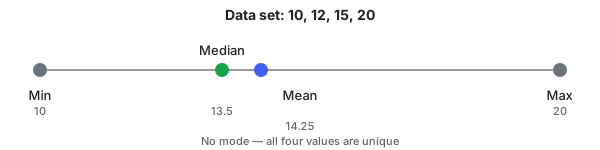
Numbers: 12, 15, 20, 10
Sorted:  10, 12, 15, 20

Sum = 10 + 12 + 15 + 20 = 57
Count = 4
Mean = 57 ÷ 4 = 14.25

Median: even count (4), so average the two middle values (12 and 15)
Median = (12 + 15) ÷ 2 = 13.5

Mode: every value appears exactly once → no mode

Range = Max − Min = 20 − 10 = 10
How to use the Average Calculator
- Enter numbers separated by commas, spaces, or new lines.
- Empty entries and text are ignored; only valid numbers are used in the result.
- Click Calculate to see Count, Sum, Mean, Median, Mode, Range, Min, and Max.
- Click Show Step-by-Step Working to see exactly how each value was derived.
- Use Clear to reset inputs.
Common mistakes to avoid
- Forgetting to sort before finding the median. The median only works on sorted data — this calculator sorts automatically, but doing it by hand is a common error.
- Assuming there's always one mode. Many everyday data sets (like unique test scores) have no repeated value at all, so "no mode" is a valid and common result.
- Using the mean on skewed data. A single very large or very small value can drag the mean away from what feels "typical" — the median is usually more representative in that case.
- Confusing range with spread measures like standard deviation. Range only looks at the two extreme values and ignores everything in between, so it's a rough measure at best.
Benefits of our Average Calculator
- Quick: Instant results in your browser (no signup).
- Complete: Mean, median, mode, and range in one calculation, not just a single average.
- Transparent: Step-by-step working shows exactly how each result was derived.
- Responsive: Works on mobile, tablet, and desktop.
- Accurate: Ignores invalid fields and calculates with proper numeric parsing.
Frequently asked questions
Can I paste numbers in any format?
Yes. You can paste numbers separated by commas, spaces, semicolons, or new lines. The calculator parses common numeric formats like 1000 or 1,000.50.
What happens with invalid entries?
Invalid values (text or non-numeric strings) are ignored. The calculator reports the number of valid entries used to compute the results.
Does it work on mobile?
Yes — the calculator and this article are fully responsive and tested on phones and tablets.
What does it mean if there's no mode?
It means every number in your list appears exactly the same number of times (often just once each), so there's no single "most common" value. This is normal and doesn't indicate an error.
Why are my mean and median different?
The mean is pulled toward unusually high or low values, while the median is not. If your data has a value far from the rest, expect the mean and median to diverge — that gap is actually a useful signal about your data's shape.
Can a data set have more than one mode?
Yes. If two or more values are tied for the highest frequency, the data set is multimodal and this calculator lists all of them.