What Is a Financial Calculator?
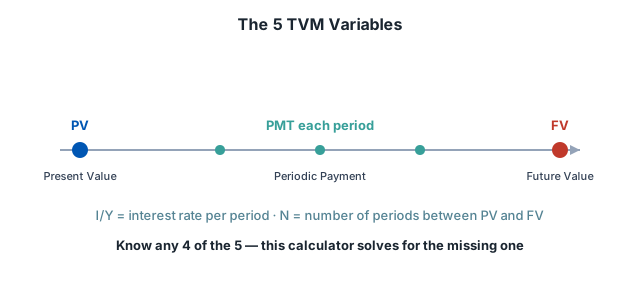
A Financial Calculator — sometimes searched as a finance calculator — is a practical online tool built around the Time Value of Money (TVM) concept: money available today is worth more than the same amount in the future, because it can earn interest. This calculator works with five variables:
- Present Value (PV) — an initial investment or loan amount
- Future Value (FV) — a target amount at the end
- Periodic Payment (PMT) — a recurring contribution or payment
- Interest rate per period (I/Y)
- Number of periods (N) — months or years
Know any four, and this calculator solves the fifth — instantly, with a chart of the balance over time.
Worked Examples
Three common real-world uses of this calculator, each solving for a different missing value:
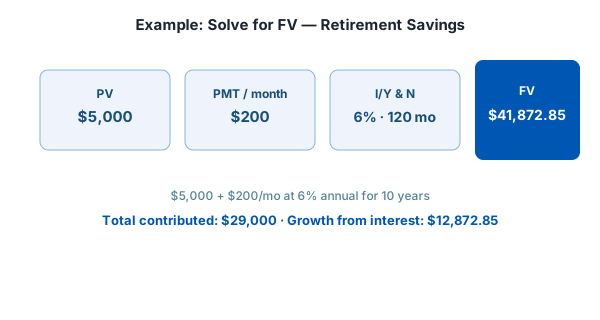
1. Solving for Future Value — Retirement Savings
Starting with $5,000, adding $200 every month, at 6% annual interest (0.5% monthly), for 10 years (120 months):
2. Solving for Payment — Loan Payoff
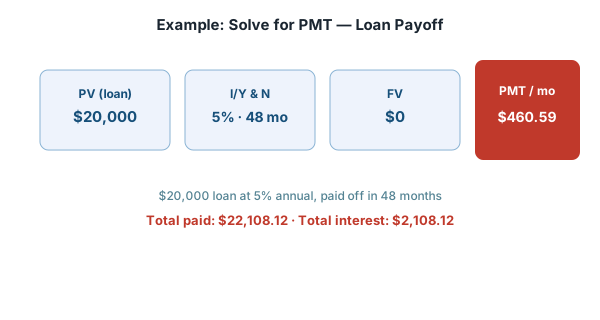
A $20,000 loan at 5% annual interest (0.4167% monthly), paid off over 48 months, down to a $0 balance:
3. Solving for Time — Savings Goal
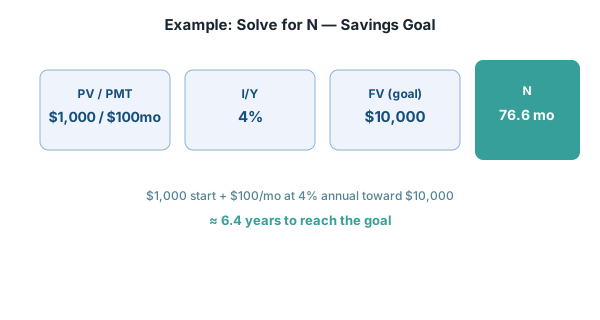
Starting with $1,000, adding $100 every month, at 4% annual interest, aiming for a $10,000 goal:
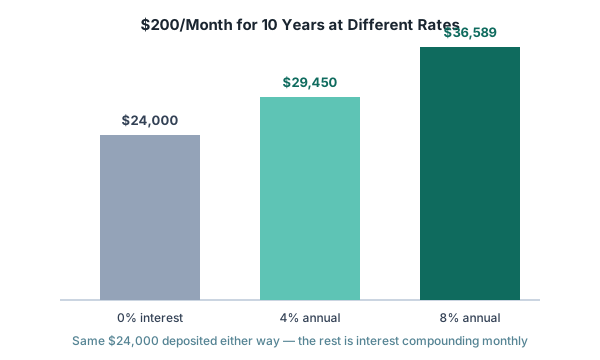
Why the Interest Rate Matters So Much
The same monthly deposit produces very different results depending on the rate, because interest compounds on top of interest:
Quick Reference — TVM Formulas
| Solving for | Formula (ordinary annuity) |
|---|---|
| Future Value | FV = PV(1+i)ⁿ + PMT × [((1+i)ⁿ − 1) / i] |
| Present Value | PV = [FV − PMT × ((1+i)ⁿ − 1)/i] / (1+i)ⁿ |
| Payment | PMT = [FV − PV(1+i)ⁿ] / [((1+i)ⁿ − 1)/i] |
| Number of periods | N = ln[(FV·i + PMT) / (PV·i + PMT)] / ln(1+i) |
Solving for the interest rate (I/Y) has no closed-form formula — this calculator finds it numerically (Newton's method).
Why Use a Financial Calculator?
- Plan Your Finances – Estimate loan payments, savings growth, or investment returns easily.
- Save Time – Avoid manual calculations and get results instantly.
- Make Accurate Decisions – Understand how interest rates, payment schedules, and periods affect your finances.
- Visualize Growth – Use the chart to track your balance over time and plan better.
How to Use This Financial Calculator
- Enter the known values for your calculation (PV, FV, PMT, Interest Rate, or Number of Periods).
- Leave exactly one field blank — the one you want the calculator to solve.
- Click Calculate to see the result instantly.
- Check the chart for a visual overview of your balance over time.
- Click Clear to reset the fields for a new calculation.
Tips for Accurate Financial Calculations
- Use Correct Values – Ensure all amounts, interest rates, and periods are accurate.
- Match Units – Keep consistency between periods and interest rate (both monthly, or both yearly).
- Keep Signs Consistent – Especially for PMT and rate, mixing signs for money in vs. money out can flip your result.
- Remember the Ordinary Annuity Assumption – If your real payments happen at the start of each period instead, results will be slightly off.
Common Mistakes When Using a TVM Calculator
- Mismatched rate and period units — entering an annual rate (like 6%) but a monthly period count (like 120) without converting the rate to a monthly figure (0.5%) first. Always convert the rate to match the period length you're using.
- Leaving more than one field blank — the calculator needs exactly four known values to solve the fifth; leaving two blank has no unique answer.
- Forgetting the annuity-timing assumption — this calculator assumes payments at the end of each period (ordinary annuity). If you're modeling payments made at the start of each period (annuity due, common for rent or insurance premiums), the true result will differ slightly from what's shown here.
- Ignoring taxes and fees — the formulas here are pure Time Value of Money math. Loan origination fees, account maintenance charges, and taxes on investment gains aren't modeled and will change your real-world number.
- Treating N loosely — N must be in the same period length as the rate. If you're compounding monthly, N is a count of months, not years.
Glossary of Key Terms
| Term | Meaning |
|---|---|
| Present Value (PV) | The value of money today — a lump sum you start with, such as a loan amount or initial deposit. |
| Future Value (FV) | The value of money at a future date, after growth or after a loan is paid down (often $0 for a fully repaid loan). |
| Periodic Payment (PMT) | A fixed amount paid or received each period — a loan installment or a recurring deposit. |
| Interest Rate per Period (I/Y) | The rate applied once per period. An annual rate must be divided by the number of periods per year to match monthly or quarterly compounding. |
| Number of Periods (N) | How many times the interest is applied — e.g., 12 periods per year for monthly compounding over one year. |
| Ordinary Annuity | A series of equal payments made at the end of each period — the assumption this calculator uses. |
| Annuity Due | A series of equal payments made at the start of each period — not modeled by this calculator. |
| Compounding | Interest earned on both the original amount and on interest already accumulated in prior periods. |
Frequently Asked Questions
What is a Financial Calculator?
A Financial Calculator (Time Value of Money calculator) solves for one unknown value among present value, future value, periodic payment, interest rate, and number of periods, given the other four.
How do I use this Financial Calculator?
Enter values into four of the five fields (PV, FV, PMT, I/Y, N) and leave exactly one blank. Click Calculate and the calculator solves for the missing value and plots the balance over time.
What does this calculator assume about payment timing?
It assumes an ordinary annuity, meaning payments happen at the end of each period. This is the standard default for most loan and savings calculations.
Should I enter negative numbers for money I pay out?
It's good practice, though not required, as long as you're consistent: money leaving your pocket (like a loan payment or investment deposit) as negative, and money you receive (like a payout) as positive. Consistent signs prevent confusing results.
Is this Financial Calculator accurate?
It uses the standard, published Time Value of Money formulas. Results are mathematically accurate for the ordinary-annuity assumption, but real-world loans and accounts can include fees or compounding rules this calculator doesn't model.
Is the Financial Calculator free to use?
Yes, it's completely free with unlimited calculations and no sign-up required.
👉 Try the Financial Calculator above and take control of your finances today!