Day Rate:
Hourly Rate:
Day Rate Calculator: How to Calculate Your Freelance Rate and Labour Cost Per Day
Transitioning from a stable 9-to-5 job into the world of freelancing is an exciting leap. You get to be your own boss, choose your projects, and work from anywhere. But then, the first big question hits you like a cold wave: "How much should I charge?"
Pricing your services is one of the most stressful parts of being a remote worker or consultant. If you charge too little, you're overworked and underpaid. If you charge too much, you might scare away potential clients. Many freelancers make the mistake of simply dividing their old salary by 12 months and calling it a day, forgetting about taxes, insurance, and those inevitable "slow" weeks.
That is where a Day Rate Calculator comes in. Whether you need a daily pay calculator to see what you're worth or a labour cost per day tool to budget for a new hire, understanding the math behind your time is the key to a sustainable business.
In this guide, we'll show you how to use our freelance pricing calculator to ensure you never undersell yourself again.
What is a Day Rate Calculator?
At its core, a day rate calculator is a financial tool designed to bridge the gap between "annual salary thinking" and "freelance reality."
When you are an employee, your salary is only part of the story. Your employer also covers your health insurance, retirement contributions, office space, and equipment. When you go solo, you become the employer. You need a way to convert salary to hourly rate or daily rates that covers these hidden costs.
Who is this tool for?
- Freelancers & Solopreneurs: To set competitive prices that actually cover their lifestyle and business expenses.
- Remote Workers & Contractors: To negotiate fair compensation when moving from a permanent role to a contract-based one.
- Small Business Owners: To answer the vital question: "What is my labour cost per day for a new team member?"
- Developers & Designers: To provide quick quotes for project-based work without the headache of tracking every single minute.
How the Day Rate Formula Works
You can't just divide your desired salary by 365 days. If you do that, you'll be working every weekend and holiday just to break even! To find a realistic freelance day rate, we use a specific formula that accounts for the "hidden" costs of being a professional.
The Formula:
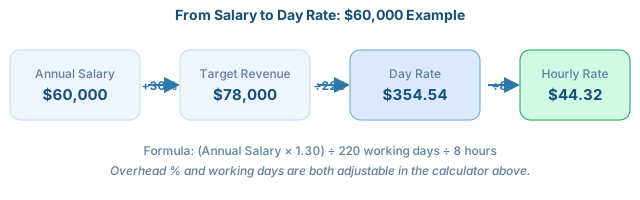
Let's break down why we use these specific numbers:
1. The Overhead Markup (The "Freedom Tax")
When you work for yourself, you are responsible for your own "benefits package." This includes:
- Self-employment taxes
- Health and dental insurance
- Software subscriptions (Adobe, Slack, Zoom, etc.)
- Hardware (that laptop won't replace itself!)
- Marketing and accounting fees
A 30% markup is a common starting point, but the calculator above lets you adjust this — some fields (like specialized consulting) push overhead closer to 40%.
2. The 220 Working Days
There are 365 days in a year, but you shouldn't be working all of them. Here's where they actually go:
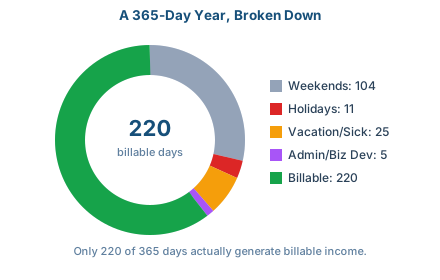
Most industry experts agree that 220 days is a realistic "billable" target for a full-time freelancer — which is why it's the default in the calculator above, though you can change it to match your own schedule.
Example Calculation: From Salary to Day Rate
Let's walk through a real-life example. Suppose you are a graphic designer who wants to earn a "salary equivalent" of $60,000 per year. Here is how you would use the day rate calculator logic to find your price.
Step 1: Add the Overheads
First, we add 30% to account for your business expenses and benefits.
$60,000 + $18,000 (30%) = $78,000 Total Target Revenue
Step 2: Divide by Working Days
Now, we divide that total by the 220 days you actually plan to work.
$78,000 ÷ 220 = $354.55 per day
Step 3: Find the Hourly Rate
If you prefer to work by the hour, simply divide your day rate by 8 hours.
$354.55 ÷ 8 = $44.32 per hour
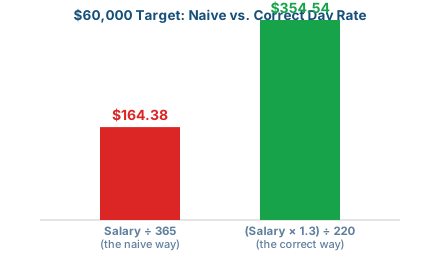
By using this method, you realize that to live a "$60k lifestyle," you actually need to be charging about $355 a day. If you had just divided $60k by 365 days ($164.38), you would have been short-changing yourself by more than half:
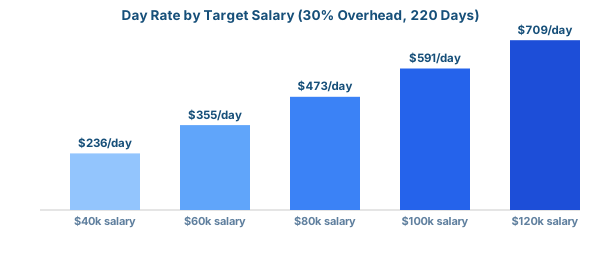
Day Rate Reference: Common Salary Targets
Using the same default assumptions (30% overhead, 220 working days), here's what the math looks like across a range of target salaries:
How to Calculate Labour Cost Per Day
If you are a business owner, you might be looking at this from the other side. You aren't asking "What should I charge?" but rather "How to calculate labour cost per day for my staff?"
Calculating the employee cost per day is vital for project budgeting and profitability. The process is almost identical to the freelance formula:
- Gross Salary: Start with the employee's base pay.
- Add Burdened Costs: Include payroll taxes, workers' compensation, 401k matches, and office perks. Usually, this is between 25% and 40% of the salary.
- Divide by Days Worked: Use the same 220-day rule to account for paid time off and holidays.
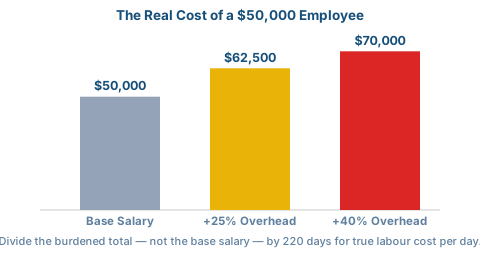
Using a daily labor cost calculator approach helps you see the "fully burdened" cost. For example, a $50,000 employee actually costs a business closer to $62,500-$70,000. Knowing this helps you price your own products or services correctly to ensure you stay in the black.
Day Rate vs. Hourly Rate: Which is Better?
One of the most common debates in the gig economy is whether to use a daily rate vs hourly rate. Both have their place, but here is the breakdown:
Best for small tasks, bug fixes, ad‑hoc support.
Pros: Precise tracking; client pays for exactly what they get.
Cons: Punishes you for being fast; "clock‑watching" stress.
Best for large projects, deep work, consulting.
Pros: Predictable income; rewards efficiency; easier invoicing.
Cons: Clients might try to cram 12 hours into one "day."
Pro Tip: Most experienced consultants prefer a freelance day rate. It allows you to focus on the value you provide rather than how many minutes you spent in front of a screen.
Why Freelancers Should Use a Day Rate
If you are still on the fence about using a freelance pricing calculator for daily rates, consider these benefits:
- Predictable Cash Flow: When you know your day rate is $500, and you book a 10-day project, you know exactly what is coming into your bank account ($5,000). With hourly billing, your income can fluctuate wildly based on small interruptions.
- Simplified Negotiations: It is much easier to negotiate a "3-day discovery phase" than it is to justify 24 individual hours. It shifts the conversation from "Why does this take an hour?" to "What can we achieve in a day?"
- Better Boundaries: A day rate sets a natural boundary. It implies that for that specific day, the client has your focus. It prevents the "just one more quick 5-minute task" creep that plagues hourly workers.
Tips to Set the Right Freelance Rate
While the day rate calculator gives you a great mathematical baseline, you should also consider these factors to fine-tune your price:
- Experience Level: If you have 10 years of experience in a niche field (like AI development or specialized law), you can—and should—charge well above the calculated average.
- Market Demand: If your skills are in high demand and low supply, your "scarcity" adds value.
- Project Length: Sometimes freelancers offer a slight discount for long-term contracts (e.g., a 6-month retainer) because it reduces the "cost" of finding new work.
- Expenses: Do you need an expensive studio? High-end servers? Specialized equipment? Make sure these are reflected in your overhead percentage.
Related Calculators You Should Know About
When searching for financial tools, you might come across a few different names. It is important to know which one you actually need:
- Daily Pay Calculator: This is virtually the same as a day rate calculator. It is used to see how much you earn per day based on a weekly or monthly salary.
- Interest Per Day Calculator: Caution! This is very different. An interest per day calculator is used for finance, loans, or savings accounts to see how much interest accrues on a balance daily. It has nothing to do with your labor or freelance rates, and this tool does not calculate interest.
- Labour Cost Per Day Calculator: Specifically used by employers to track the total cost of an employee, including taxes and insurance.
Who Should Use This Calculator?
If you fall into any of the following categories, a day rate calculator should be a permanent bookmark in your browser:
- Software Developers – for quoting sprints or feature builds.
- Graphic Designers – for branding packages that take several days of focus.
- Content Writers & Editors – for large-scale content audits or strategy sessions.
- Business Consultants – for on-site workshops or high-level advisory days.
- Tradespeople & Contractors – for calculating the daily labor cost of a crew on a construction site.