What Is a Binary Calculator?
A Binary Calculator is an online tool that allows you to perform arithmetic operations with binary numbers. You can add, subtract, multiply, and divide binary numbers quickly and accurately without manual conversion. It also provides decimal and hexadecimal equivalents for better understanding.
Understanding the Binary Number System
Binary is a base-2 number system, meaning each digit (or "bit") represents a power of 2, compared to the base-10 decimal system you use every day. Reading from right to left, each position doubles in value:
| Bit position | 8 | 7 | 6 | 5 | 4 | 3 | 2 | 1 |
|---|---|---|---|---|---|---|---|---|
| Place value | 128 | 64 | 32 | 16 | 8 | 4 | 2 | 1 |
To read a binary number, multiply each 1 by its place value and add the results together (0s contribute nothing).
Binary Addition and Subtraction Rules
Binary math follows simple carry and borrow rules:
| Addition | Result |
|---|---|
| 0 + 0 | 0 |
| 0 + 1 | 1 |
| 1 + 1 | 10 (write 0, carry 1) |
| 1 + 1 + 1 (with carry) | 11 (write 1, carry 1) |
Subtraction works the same way in reverse, borrowing from the next column when subtracting 1 from 0.
How to Convert Binary to Decimal
Example: convert 101101 to decimal by multiplying each bit by its place value:
1×32 + 0×16 + 1×8 + 1×4 + 0×2 + 1×1 = 32 + 8 + 4 + 1 = 45
How to Convert Decimal to Binary
Example: convert 45 to binary by dividing repeatedly by 2 and reading the remainders bottom to top:
45 ÷ 2 = 22 remainder 1
22 ÷ 2 = 11 remainder 0
11 ÷ 2 = 5 remainder 1
5 ÷ 2 = 2 remainder 1
2 ÷ 2 = 1 remainder 0
1 ÷ 2 = 0 remainder 1
Reading bottom to top: 101101
Binary to Hexadecimal Quick Reference
Since 16 = 2⁴, every group of 4 bits maps directly to one hex digit:
| Binary | Hex | Binary | Hex |
|---|---|---|---|
| 0000 | 0 | 1000 | 8 |
| 0001 | 1 | 1001 | 9 |
| 0010 | 2 | 1010 | A |
| 0011 | 3 | 1011 | B |
| 0100 | 4 | 1100 | C |
| 0101 | 5 | 1101 | D |
| 0110 | 6 | 1110 | E |
| 0111 | 7 | 1111 | F |
Why Use an Online Binary Calculator?
- Accuracy: Avoid manual calculation errors with instant results, even for numbers up to 64 digits long.
- Speed: Get solutions in seconds, saving time on complex binary math.
- Learning Tool: Ideal for students and professionals learning binary arithmetic.
- Convenience: Accessible on desktop, tablet, and mobile devices anytime.
How to Use Our Binary Calculator
- Enter the first binary number in the input field.
- Enter the second binary number.
- Select the operation: addition, subtraction, multiplication, or division.
- Click Calculate to see results instantly in binary, decimal, and hexadecimal.
Key Features of the Binary Calculator
- Multiple Operations: Add, subtract, multiply, and divide binary numbers easily.
- Decimal & Hex Conversion: Instantly see decimal and hexadecimal equivalents of every result.
- Large Number Support: Handles binary numbers up to 64 digits without precision loss.
- Remainder Display: Division results show both the quotient and the remainder.
- Free and Accessible: No registration required, works on all devices.
Examples of Binary Calculations
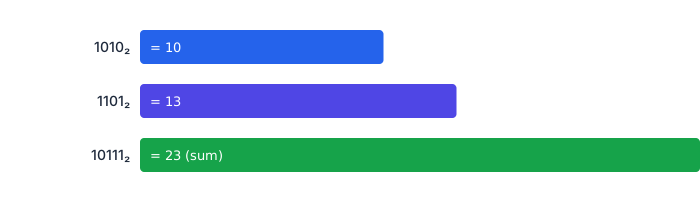
- Example 1: 1010 + 1101 = 10111 (Decimal: 10 + 13 = 23)
- Example 2: 110 × 101 = 11110 (Decimal: 6 × 5 = 30)
- Example 3: 1011 ÷ 11 = 11 remainder 10 (Decimal: 11 ÷ 3 = 3 remainder 2)
Common Mistakes in Binary Math
- Forgetting to carry the 1 when adding two 1s together.
- Misaligning bit columns, especially when the two numbers have different lengths.
- Confusing the most significant bit (leftmost) with the least significant bit (rightmost).
- Dropping leading zeros that matter when comparing fixed-width binary numbers.
Who Can Benefit from the Binary Calculator?
- Students: Practice binary operations for math and computer science courses.
- Teachers: Demonstrate binary calculations in classroom lessons.
- Professionals: Quickly perform binary math in computing, electronics, and coding tasks.
Frequently Asked Questions
Conclusion
The Binary Calculator is an essential tool for anyone working with binary numbers. It simplifies complex operations, ensures accuracy, and provides instant decimal and hexadecimal conversions. Whether you are learning, teaching, or working in a tech-related field, this calculator helps you handle binary math efficiently.
👉 Try our Binary Calculator today and make binary arithmetic fast, accurate, and effortless!