Add Watermark to PDF Online – Free, Fast & Secure Tool
Add Watermark to PDF
What Is a PDF Watermark?
A watermark PDF tool is a specialized software or online application designed to embed visible or invisible marks into PDF documents. These marks—whether they are text, logos, signatures, patterns, or even faint backgrounds—serve two primary purposes: protection and branding. Think of it as stamping your identity onto a document without altering its original content. The watermark lives "on top" of the PDF layer, unobtrusive yet powerful enough to signal ownership and prevent misuse. It is commonly used for:
- Document branding
- Copyright protection
- Marking files as "Confidential," "Draft," or "Sample"
- Adding company names, logos, or signatures
Adding a watermark keeps your files professional and secure while preventing unauthorized use.
Looking for an easy way to add a watermark to your PDF files? Our Add Watermark PDF Tool lets you insert text or image watermarks into any PDF within seconds. No software installation, no registration, and completely free to use. Whether you want to protect your documents, brand your files, or mark them as confidential, this tool is the simplest solution.
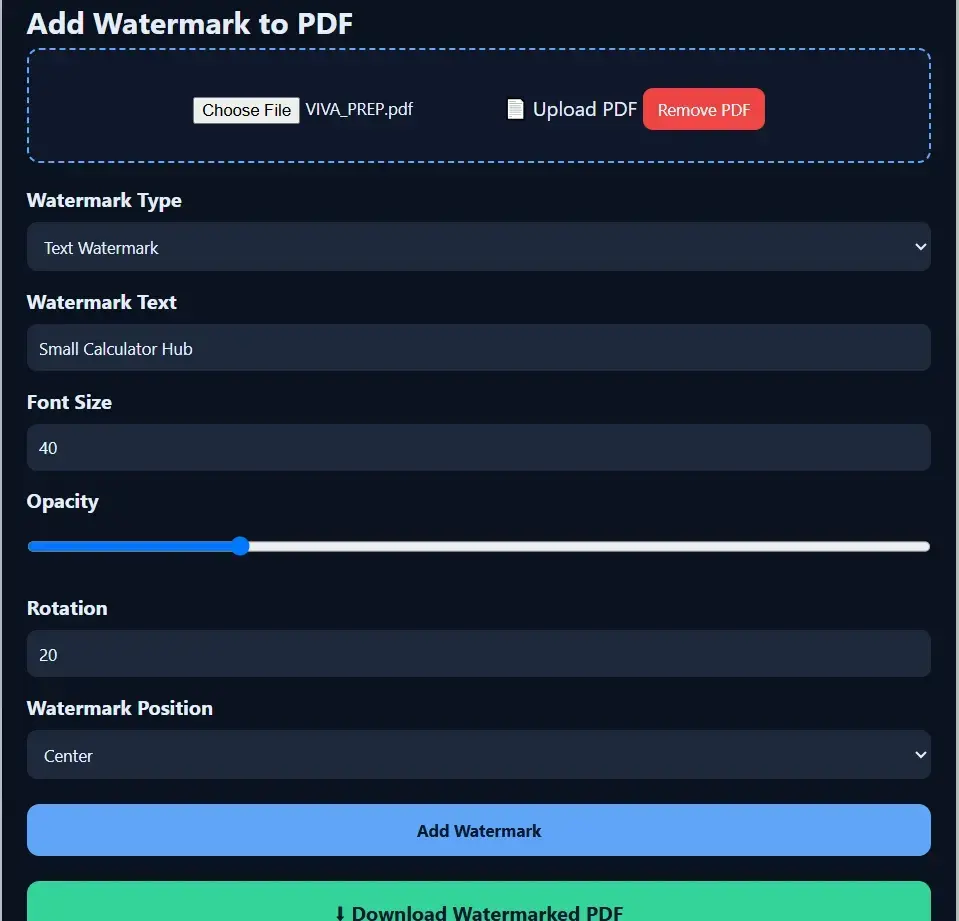
How to Add Watermark to PDF Online
Follow these simple steps:
1. Upload your PDF file
You can drag and drop your PDF or select it from your device.
2. Choose Text or Image Watermark
Add your text (e.g., "SMALLCALCULATORHUB", "DRAFT") or upload a logo/image.
3. Customize Settings
You can adjust size, opacity, rotation, and position of the watermark.
4. Apply Watermark
Click the button to generate your watermarked PDF.
5. Download the Final File
Your new PDF will be ready in seconds.
Why Use Our Add Watermark PDF Tool?
Our tool is designed to be fast, safe, and user-friendly. Here's why users prefer it:
100% Free & Online
You don't need to download software or create an account. Everything happens in your browser.
Add Text or Image Watermarks
Upload your PDF and choose between a custom text watermark or image watermark such as a logo.
Customize Everything
You get full control, including:
- Watermark size
- Opacity
- Color (default: black for clarity)
- Rotation angle
- Position (top, center, bottom, diagonal, etc.)
Runs Entirely in Your Browser
This tool uses client-side PDF processing, meaning your file is never uploaded to a server. Everything — reading the PDF, applying the watermark, and generating the download — happens locally on your device. Your document never leaves your browser.
Works on All Devices
Mobile, tablet, and desktop — the tool works smoothly everywhere.
Who Can Use This Tool?
This tool is useful for:
- Students
- Teachers
- Office workers
- Lawyers
- Business owners
- Graphic designers
- Content creators
Anyone needing fast, reliable watermarking can use it instantly — no account, no upload, no wait.
Why Use a Watermark PDF Tool?
Watermarking a PDF isn't just about looking professional — it's a practical way to protect and identify your work. Any file you share can be downloaded, copied, or redistributed without your knowledge; a visible watermark discourages that, and even if someone tries to crop or edit it out, the attempt is usually obvious. If your document turns up online without permission, your watermark also serves as evidence of ownership.
It's useful for branding too. A logo or name on every page keeps your work identifiable wherever it's shared — useful for photographers, freelancers, and anyone sending proposals or reports. And for internal documents, labeling files "CONFIDENTIAL," "DRAFT," or "INTERNAL USE ONLY" makes their purpose clear at a glance.
Common uses:
- Discouraging unauthorized copying or sharing
- Adding a company name, signature, or logo to documents
- Labeling files as Draft, Paid, Original, Confidential, or Invoice
- Making shared documents look official and traceable back to you
Frequently Asked Questions
1. Is the tool free to use?
Yes, completely free—no hidden charges.
2. Is my file safe?
Yes. Your PDF is processed entirely in your browser using client-side JavaScript. It is never uploaded to a server, so there's nothing to store or delete — the file simply never leaves your device.
3. Can I add watermarks to multiple pages?
Yes, your watermark is applied automatically to all pages.
4. Does the watermark stay editable?
No, once added, it becomes part of your PDF to prevent removal or tampering.