Word Counter with Readability Score
Type or Paste Your Text
What Is a Word Counter and Why It Matters
A word counter is a digital tool that calculates the number of words, characters, or sentences within any text. Writers, students, marketers, and editors rely on it to stay within important guidelines, such as assignment limits, SEO word counts, and social media restrictions.
In today's fast-paced digital world, maintaining the right length is critical. Too many words can overwhelm readers, while too few can leave important details out. This tool goes a step further than a basic count — it also estimates readability, reading and speaking time, and keyword density, all calculated live as you type.
Understanding Your Readability Score
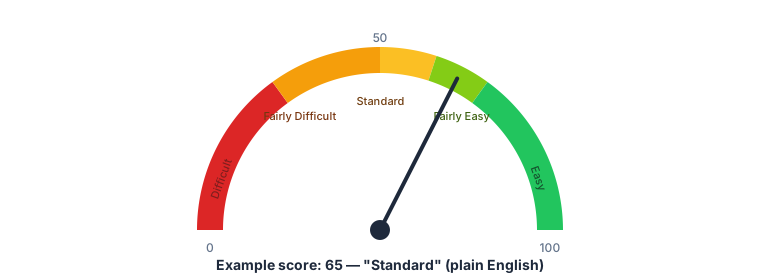
The readability score above your text is the Flesch Reading Ease score, calculated from your average sentence length and average syllables per word. It ranges from 0 to 100 — higher means easier to read. A score of 60-70 is considered plain English that's comfortable for most adult readers; below 30 is dense, specialist writing.
The formula counts syllables using an estimate (vowel groups per word), so treat the score as accurate to a few points rather than an exact decimal — this is standard practice for every automated readability tool, not a limitation unique to this one.
| Score | Reading level |
|---|---|
| 90-100 | Very easy — comfortable for an 11-year-old |
| 60-70 | Standard — plain English for most adults |
| 30-50 | Fairly difficult — college level |
| 0-30 | Very difficult — specialist or academic writing |
Understanding Keyword Density
Keyword density is how often a specific word repeats relative to your total word count. This tool automatically lists your top 5 most-repeated words (skipping common words like "the" and "and") along with how many times each appears and what percentage of your total word count that represents.
This is genuinely useful two ways: for SEO writing, it helps confirm your target keyword actually shows up often enough without being obviously repetitive; for general writing, it can flag a word you're unconsciously overusing.
Reading Time vs. Speaking Time
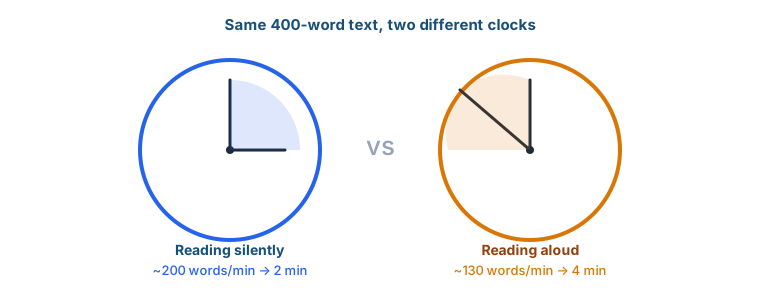
Reading Time estimates how long it takes an average adult to read your text silently, using a common baseline of about 200 words per minute. Speaking Time estimates how long the same text takes to read aloud, using a slower baseline of about 130 words per minute — useful for planning a presentation, video script, or podcast segment where every word gets spoken, not skimmed.
Anatomy of a Text: What Actually Gets Counted
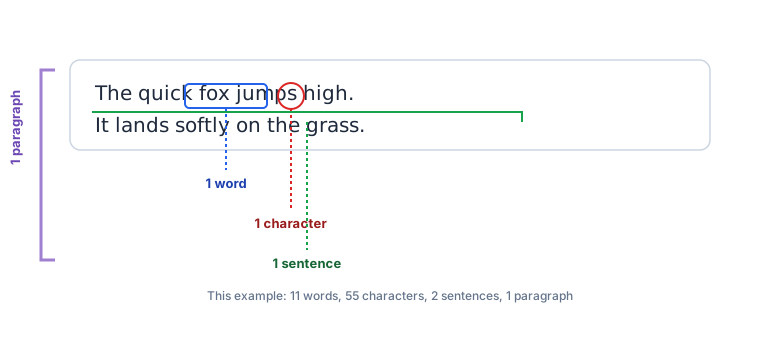
Words are counted by whitespace-separated chunks. Sentences are counted by runs of ., !, or ? — so abbreviations like "Mr." or "e.g." can occasionally inflate the sentence count slightly, a known limitation of this simple approach shared by most word counters. Paragraphs are counted by blank lines between blocks of text, not every single line break — if you're pasting text with a single line break between thoughts, it will count as one paragraph unless there's a full blank line separating them.
Common Character Limits by Platform
Once you know your character count, here's what it needs to fit under on common platforms (current as of 2026):
| Platform | Limit |
|---|---|
| X (Twitter) standard post | 280 characters |
| Google meta description | ~155-160 characters (practical guideline) |
| Instagram caption | 2,200 characters (only ~125 show before "more") |
| LinkedIn post | 3,000 characters |
| YouTube video title | 100 characters |
The four progress bars above your text box track the first four of these limits live, so you can see at a glance whether your draft fits before you try to post it.
How a Word Counter Improves Writing Quality
A word counter does more than count. It helps writers produce clearer, more readable content, guiding structure, flow, and organization — especially when writing long articles or meeting strict publishing guidelines.
Enhancing Clarity and Conciseness
Good writing is concise, clear, and to the point. By monitoring real-time word count, writers avoid rambling or adding unnecessary filler.
Avoiding Overwriting and Underwriting
Assignments, ads, and articles all require strict limits. A word counter ensures you never exceed or fall short of required lengths.
Who Needs a Word Counter?
Many professionals rely on word counters daily.
Students and Academics
Research papers, essays, and dissertations have specific word count guidelines. A word counter helps students meet those requirements without guesswork.
Professional Writers and Bloggers
Blogging platforms often target 1,500–2,500 words for SEO, though the ideal length varies a lot by topic and search intent. Word counters help writers track their progress toward whatever range fits their piece.
Social Media Managers
Platforms like X, Instagram, and LinkedIn have strict character limits. The live limit bars in this tool help fine-tune posts before you try to publish them.
How to Use This Word Counter Effectively
Using this word counter is simple but powerful.
Copy-Paste Method
Copy your text and paste it directly into the box above. Results appear instantly.
Real-Time Typing Mode
Type directly inside the tool to track every stat as you write, including your live readability score.
Pre-Publish Check
Before posting to social media, check the platform limit bars to confirm your text fits without truncation.
Common Mistakes to Avoid When Using a Word Counter
- Depending on the tool for grammar — a word counter checks length, not correctness.
- Ignoring character limits until after you've finished writing.
- Forgetting to check keyword density before publishing SEO content.
Tips for Getting the Most Out of This Tool
Use It During Drafting
Check your count frequently to stay on track, rather than writing the whole piece and hoping it lands in range.
Use It Before Publishing
Do one final check of length, readability, and keyword density to ensure everything's aligned before you hit publish.