PDF to JPG Converter – Free, Fast & Private, Right in Your Browser
Convert PDF to JPG
Select PDF (max 10 pages per conversion)
🔒 Your file is processed entirely in this browser tab. It is never uploaded anywhere.
PDF to JPG Converter: How It Actually Works
In today's digital world, flexibility is everything. While PDFs are the gold standard for sharing documents securely, they aren't always the most convenient format for every situation. Sometimes you don't need a whole document — you just need one page as a high-quality image.
Whether you're uploading a certificate to a social media profile, including a chart in a slide deck, or sharing a flyer on WhatsApp, a PDF to JPG converter is a genuinely useful tool. This one runs the conversion directly in your browser rather than sending your file anywhere.
What This Tool Actually Does
This tool renders selected PDF pages as JPG images using your browser's own PDF-rendering engine (pdf.js) and the HTML canvas — the same technology browsers use to display PDFs natively. It converts whole pages into images; it does not extract individual embedded images from inside a PDF's content stream, which is a different, more specialized feature.
Because everything happens locally, your file is never uploaded to a server, there's nothing to encrypt in transit, and there's nothing to "delete later" — it simply never leaves your device in the first place.
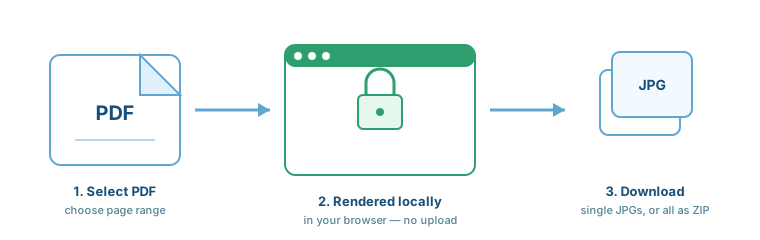
How to Convert PDF to JPG (Step-by-Step)
- Select your PDF: Click the upload box and choose your file.
- Enter a page or range: A single page number (like 5) or a range (like 1-5), up to 10 pages.
- Choose image quality: Standard, High (default), or Extra High.
- Click Convert: Your browser renders each page as a JPG in a few seconds.
- Download: Save pages individually, or click "Download All as ZIP" to get every page in one file.
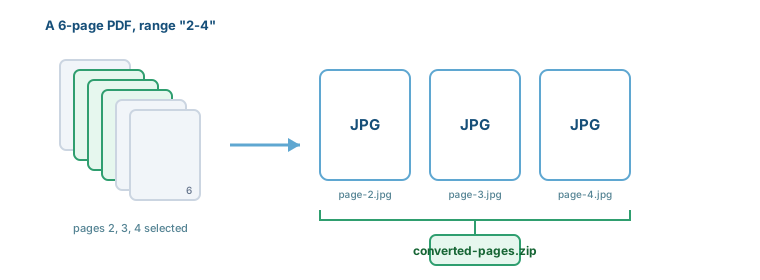
Key Features of Our PDF to JPG Converter
Benefits of Converting PDF to JPG
- Easy Sharing: JPGs work on platforms like Instagram and Pinterest that don't accept PDF uploads.
- Universal Compatibility: Any device with a photo viewer can open a JPG — no PDF reader needed.
- Lightweight Previews: Scrolling through a gallery of images is faster than paging through a PDF.
- Presentation-Ready: Drop a JPG straight into a slide deck without formatting issues.
Who Should Use This Tool?
- Students: Turning a certificate or assignment page into an image for a portal upload.
- Designers: Pulling a single visual page from a brand guide PDF.
- Office Workers: Converting a report page into an image for a presentation.
- Social Media Managers: Turning a PDF flyer into a shareable image post.
Real-Life Use Cases
Sharing a chart: If you have a 50-page report but only need the chart on page 12, convert just that page into a JPG.
Book previews: Convert the first page of an eBook into a JPG to use as a promotional thumbnail.
Social posts: Turn a PDF flyer into a high-resolution image for a story or post.
Printing: Some print shops prefer a high-res JPG for photo-quality printing over a PDF.
Why This Tool Is Different
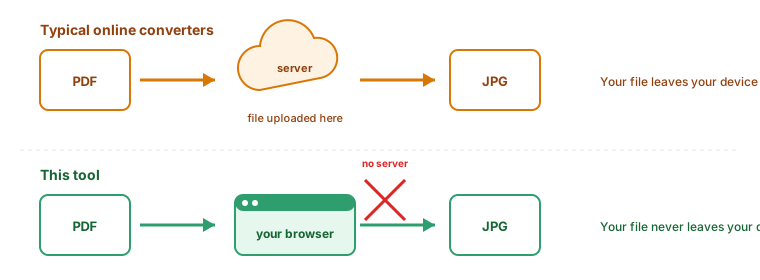
- No Uploads: Most online converters send your file to a server. This one doesn't — everything happens in this browser tab.
- No Signup Required: No email address or account needed.
- No Watermarks: Your images come out clean, exactly as rendered.
- Adjustable Quality: Choose Standard, High, or Extra High rendering before you convert.
Tips for Best Results
- Use High-Quality Source PDFs: The output image is only as sharp as the original PDF.
- Pick Extra High for text-heavy pages: Fine print holds up better at 3x scale.
- Convert just what you need: Selecting a specific page range keeps file sizes smaller.
Common Mistakes to Avoid
- Uploading the wrong format: This tool is specifically for .pdf files.
- Expecting to edit text afterward: The output is an image — the text inside it can no longer be edited or selected.
- Requesting more than 10 pages: Split larger jobs into a few conversions of 10 pages or fewer.
PDF vs. JPG: Which One Do You Need?
| Feature | JPG | |
|---|---|---|
| Editing | Hard to edit text without special tools. | Easy to edit using any photo editor. |
| Compatibility | Requires a PDF reader. | Works on all devices and browsers. |
| Multi-page | Supports multiple pages in one file. | One image per file (this tool can ZIP several together). |
| Social Media | Not supported by most platforms. | Fully supported everywhere. |