What Is a Car Loan Calculator?
A Car Loan Calculator is an online financial tool that helps you estimate your monthly car payments and total loan cost. It works by using mathematical formulas (amortization schedules) to break down your loan into manageable monthly payments. The calculator takes into account factors such as the loan amount, interest rate, loan term, down payment, trade-in value, and sales tax to give you a clear picture of what you'll be paying.
- Loan amount – Car price minus your down payment and trade-in value (plus any financed sales tax).
- Interest rate (APR) – The annual percentage rate charged by the lender.
- Loan term – The number of months or years you'll repay the loan (e.g., 36, 48, 60, 72 months).
- Down payment – Cash you put down upfront to reduce your loan balance.
- Trade-in value – Value of your old vehicle applied toward your new purchase.
- Sales tax – Many states tax the purchase price (often net of trade-in); this calculator lets you add that into the financed amount.
Once you input these details, the calculator instantly shows you your estimated monthly payment, total interest paid over time, and the total cost of the loan. This helps you avoid surprises and plan better.
Example: Breaking Down a $20,000 Car Loan
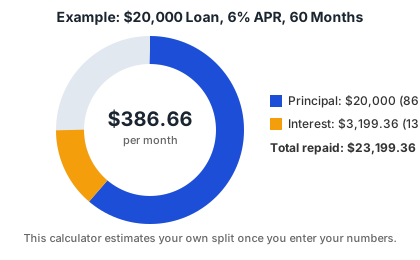
Say you finance $20,000 at 6% APR over 60 months. Your monthly payment comes out to $386.66, and over the life of the loan you'll pay $3,199.36 in interest — about 13.8% on top of what you borrowed:
How Your Balance Shrinks Over Time (Amortization)
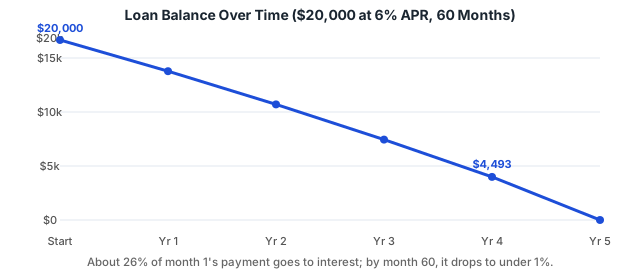
Every payment you make is split between interest and principal. Early on, more of each payment goes toward interest because the balance is still high; later, more goes toward paying down what you actually borrowed. Here's how the balance on that same $20,000 / 6% / 60-month loan declines year by year:
How Loan Term Affects Your Payment
The same loan amount can cost very differently depending on how long you take to repay it. A shorter term means a higher monthly payment but noticeably less interest paid overall; a longer term spreads the cost thinner month-to-month but adds up over time. Here's the same $20,000 loan at 6% APR across four common terms:
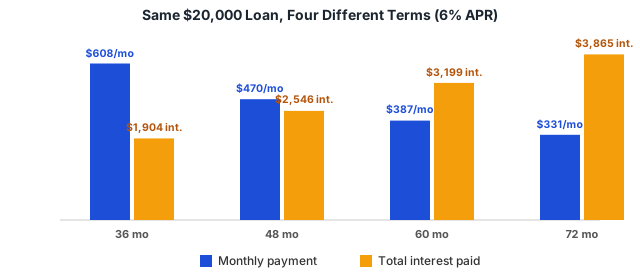
Notice that going from 36 to 72 months roughly cuts your monthly payment in half — but more than doubles your total interest. When you calculate your own numbers above, a comparison table like this one appears automatically so you can see the same tradeoff for your specific loan.
Why Use a Car Loan Calculator?
You might wonder: "Why can't I just rely on the dealer's numbers?" The truth is, dealerships often present financing in a way that looks attractive in the short term but can cost you more in the long run. A Car Loan Calculator puts the power back in your hands by letting you test scenarios before making a commitment.
- Plan Your Budget – The calculator shows you exactly what your monthly car payment will look like. This ensures you don't commit to a loan that strains your finances. A car may look affordable based on its sticker price, but once you add interest, taxes, and fees, the total cost could be much higher than expected.
- Compare Loan Options – You can try out different loan terms (36 months vs. 72 months) and APRs (5% vs. 7%) to see how they impact your monthly payment and total cost. This allows you to choose the best balance between affordability and long-term savings.
- Save Money – By experimenting with different down payments and trade-in values, you'll see how putting more money upfront reduces both your monthly payments and total interest paid. Even an extra $1,000 down could save you hundreds in interest.
- Make Confident Decisions – Walking into a dealership with realistic numbers means you're less likely to be pressured into a bad financing deal. You'll know what payment range is acceptable before signing anything.
How Does a Car Loan Calculator Work?
At its core, a car loan calculator uses the standard amortization formula to calculate monthly payments. Don't worry—you don't need to be a math genius to use it, but understanding how it works gives you an edge.
Here's the formula most calculators use:
M = P × [r(1 + r)^n] / [(1 + r)^n – 1]
Where:
- M = Monthly payment
- P = Loan principal (amount borrowed)
- r = Monthly interest rate (APR ÷ 12)
- n = Number of payments (loan term in months)
For example, if you borrow $20,000 at 6% APR for 60 months, the calculator will compute your exact monthly payment by breaking down the loan into equal installments (see the chart above). Over time, your payment stays the same, but the portion going toward interest decreases while the portion going toward principal increases. This is called amortization.
With a calculator, you don't need to crunch the numbers yourself. Just enter the loan details, and you'll see results instantly.
How to Use Our Car Loan Calculator
Using a car loan calculator is straightforward, even if you're not financially savvy. Here's a step-by-step process:
- Enter the purchase price of the vehicle.
- Input your down payment and trade-in value (if any).
- Add your local sales tax rate if you want it financed into the loan.
- Enter the APR (interest rate) offered by your lender.
- Select your loan term (e.g., 36, 48, 60, or 72 months).
- Click Calculate to see your results.
Within seconds, you'll get:
- Your estimated monthly payment
- Total interest paid over the life of the loan
- Total cost of the loan (principal + interest)
- A visual breakdown of principal vs. interest
This lets you instantly evaluate whether a car fits your budget. For example, if your monthly budget allows $400, but the calculator shows $520, you may need to increase your down payment, choose a cheaper car, or negotiate a lower APR.
Key Terms You Should Know Before Using a Car Loan Calculator
To get the most out of a calculator, it's important to understand the financial terms you'll encounter during the car-buying process.
- Principal – The total amount of money borrowed after subtracting your down payment and trade-in.
- APR (Annual Percentage Rate) – The yearly cost of borrowing, expressed as a percentage, which includes interest and sometimes lender fees.
- Term – The length of your loan, usually expressed in months (36, 48, 60, 72).
- Amortization – The process of gradually paying down a loan through scheduled payments.
- Negative Equity – When you owe more on your loan than the car's current market value, often due to small down payments or long loan terms.
- Balloon Payment – A large final payment at the end of some loans (less common for regular car loans but seen in special financing deals).
Knowing these terms ensures you understand exactly what the calculator is showing you—and prevents surprises when signing your loan contract.
Frequently Asked Questions (FAQs)
A Car Loan Calculator is an online tool that helps you estimate your monthly loan payments, total interest, and overall cost of financing a vehicle based on the car price, loan term, down payment, and interest rate.
Enter the vehicle price, down payment, trade-in value if any, sales tax rate if applicable, interest rate, and loan term. The calculator will display your estimated monthly payment and total loan cost.
You can use the Car Loan Calculator for auto loans on new or used cars, refinancing existing car loans, or comparing different financing options.
Using a Car Loan Calculator helps you budget better, compare loan options, and understand how interest rates and loan terms affect your monthly payments.
Yes, our Car Loan Calculator is completely free to use and works on desktops, tablets, and smartphones.